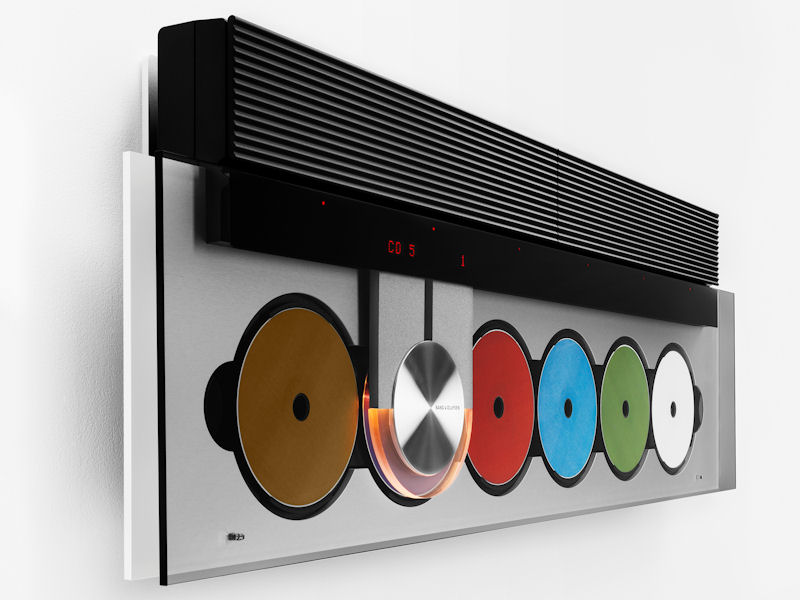
Beosound 9000

B&o Authorized Service Center

Beosound 9000
MK I · MK II · MK III

Evolution, hardware flaws & service insights (1996 – 2006)

Bang & Olufsen’s Beosound 9000 is a mechanical marvel, but even iconic designs have their weak points. Over the years, collectors and repair specialists have identified recurring hardware failures — from the CDM mechanism to glass delamination, power supply gremlins, and the famous “claw” rail issues. Each revision (MK I, MK II, MK III) brought fixes, but also introduced unique failure modes.

Below you'll find not only the evolution of features but also the known hardware errors for each generation, plus a cross-model list of common failures and repair notes.

🔧 Real-world reliability: Many Beosound 9000 units still work after 25+ years, but age-related failures are normal. Most errors can be fixed with belt replacement, laser calibration, or rail lubrication.
MK I Original 1996
Type 252*
  • Red power button: ✓ Physical (bottom edge)
  • CD mechanism: First-gen CDM 1st revision
  • N.Music upgrade: Possible

🛠️ KNOWN HARDWARE ERRORS (MK I)

  • Glass panel delamination: Early adhesive fails → bubbles around edges / loose glass.
  • Claw transport squeaking / jamming: Rail grease dries out, causing stuck mechanism or loud operation.
  • CDM 1st gen laser failure: Higher rate of skipping or "No Disc" errors; laser pickup ages faster.
  • Power supply capacitor ageing: PSU instability, random reboots, or failure to power on.
  • Motor belt stretch (tray/disc clamp): Disc loading issues, delayed tray movement.
📍 MK I specific: Early glass adhesion is the most notorious. Some units suffer from brittle plastic in the disc stabilizer.
MK II Mid-production
Type 256*
  • Red button: ❌ Removed (most units)
  • Updated PSU & controller
  • Improved CDM tracking

🛠️ KNOWN HARDWARE ERRORS (MK II)

  • Standby power supply failure: No hard power switch → small transformer or capacitor failure leaves unit dead.
  • Display dimming / flicker: VFD (vacuum fluorescent display) driver issues or ageing.
  • Claw position sensor errors: Optical sensor gets dirty → wrong disc detection or endless searching.
  • Disc magazine alignment: Misalignment after years of use leads to scraping sounds.
  • Laser pickup ageing (CDM2): Improved but still prone to failure after 10k+ hours.
🔄 MK II quirk: Because the red button is missing, units in standby still keep the PSU active — increases heat stress on capacitors.
MK III Final revision
Type 257*
  • Red button: ✓ Returns (EU hard off)
  • PIN code security lock
  • Latest CDM + refined rail

🛠️ KNOWN HARDWARE ERRORS (MK III)

  • Microswitch failure (door/drawer): Motorized glass cover loses “closed” detection → cover won't open/close.
  • PIN code lockout glitch: Rare firmware bug can lock the unit (requires factory reset via service menu).
  • Claw belt wear: Rubber belt driving the horizontal transport stretches → slow disc selection or error 3.
  • Ribbon cable fatigue (moving arm): Constant flexing may cause intermittent CD reading.
  • Laser diode aging: Despite improved CDM, lasers eventually fail; harder to source replacements.
MK III advantage: Glass adhesion and power supply are much more robust. The hard red button reduces standby stress.

🔩 Universal hardware failures (all MK I–III)

Failure areaSymptomsAffected generationsTypical fix
Claw transport beltSluggish or stuck horizontal movement, error message “MECHANISM”MK I, MK II, MK IIIReplace belt (common size 70mm), clean rail, re-grease
Laser pickup (CDM)Skipping, “NO DISC”, takes long to read TOCAll, MK I worstLaser replacement / adjustment or CDM swap
Glass cover motor gearGlass opens halfway or not at all, grinding noiseAll (more frequent on early MK I)Grease worm gear, replace plastic gear if cracked
Power supply electrolytic capsUnit won’t start, random reset, humming noiseMK I & MK II most prone; MK III improvedRecap PSU board
Display VFD fadingDim segments, missing characters, flickerMK I / MK II (MK III slightly better)Check heater voltage; VFD driver repair
Disc magazine spindle slipMagazine doesn’t index properly, disc gets stuckAllClean spindle clutch, replace friction pad
🧰 Pro tip: Many Beosound 9000 errors are mechanical, not electronic. Regular service (every 5-10 years) including belt replacement, laser cleaning, and rail lubrication keeps them running for decades.
Feature / ReliabilityMK I (Type 252)MK II (Type 256)MK III (Type 257)
Glass delamination risk🟠 High (early adhesive)🟡 Moderate (improved bonding)🟢 Low (mature process)
CDM laser lifespan🟡 ~10–15 years avg🟢 better than MK I🟢 best longevity
Power supply robustness🟠 capacitor failure common🟡 moderate, but no hard switch🟢 reinforced + hard power off
Claw rail mechanism🟡 dries out quickly🟢 smoother rail coating🟢 same as MK II+
Motorized glass motor🟠 gear wear frequent🟡 improved materials🟢 final revision
Known electronic bugs🟡 early firmware glitches🟢 stable🟢 stable + PIN lock

⚠️ Error codes & self-diagnosis (all models): Beosound 9000 can display service codes. Error 2 = laser / focus issue; Error 3 = claw transport time-out (belt or rail); Error 4 = magazine not indexed; Error 7 = communication failure with display. Most hardware errors trigger these codes.

🔴 The red button myth and hardware correlation: MK I introduced the red button, MK II removed it (leading to some early MK II units with no hard off, causing extra PSU stress). MK III brought it back — this change also improved long-term reliability because the unit can be completely disconnected from mains when not in use. If you own a MK II, it's recommended to unplug or use a smart switch to reduce capacitor aging.

📢 Collector note: When buying a used Beosound 9000, always test the claw mechanism with all 6 disc positions, listen for grinding, and check the glass panel edges for any delamination. MK III units are generally the most reliable, but early MK I have the highest “original charm” and are more sought after by purists despite hardware flaws.