Bang & Olufsen Authorized Service Center
 📍 Los Angeles County & SoCal
🔧 30+ Years Experience
🎚️ B&O Specialist
🏢 TEK Media Group
📍 Los Angeles County & SoCal
🔧 30+ Years Experience
🎚️ B&O Specialist
🏢 TEK Media Group
📋 A NOTE FROM MY WORKBENCH: Beocom cordless phones (6000 series, 1, 2, 5) operate on DECT or 2.4 GHz technology and rely on NiMH battery packs that degrade after 3–5 years. Charging contacts oxidize, rubber keypads harden, and scroll wheels/jog dials lose tactile feel. DECT handset registration to BeoLine PSTN/ISDN bases can fail due to firmware glitches or hardware aging. Corded analog models (2000/2200/1000) contain custom microcontrollers (Toshiba TMP47C452AN), lithium‑backed memory for phonebook storage, and aluminum‑case electrolytic capacitors that leak over time. I have the expertise, schematics, and replacement parts to restore all Beocom models correctly.
⚠️ CRITICAL WARNING – BEOCOM SPECIFIC: Beocom 6000/1/2/5 handsets contain NiMH battery packs that can leak corrosive electrolyte if left discharged for years. Always remove old batteries before shipping. Charging circuits in BeoLine bases can fail due to dried capacitors, sometimes damaging the handset. Do not leave handsets on base if the base shows no LED activity. I test all charging bases and can repair them as needed.
- Design: By Gideon Loewy (Lindinger-Loewy), grid‑like bold color options.
- Memory: 10 numbers (up to 20 digits each), emergency red‑button key.
- Color‑coded keys: Green (numbers/symbols), yellow (volume), blue (redial).
- Durability: Tested to 100,000 handset lifts.
🛠️ Known failures
- Handset PCB contamination after decades (non‑functional buttons).
- Internal speaker membrane deterioration (distorted sound).
- PSTN line transformer failure (no dial tone).
- Handset cable internal wire breakage (intermittent connection).
Iconic 1980s design — displayed at Norwegian Museum of Science and Technology.
- First B&O phone with LCD display — shows dialed number, call duration.
- Microprocessor: Toshiba TMP47C452AN with lithium‑battery backup.
- Memory: 20 phone numbers + last 3 redial.
- Aluminum‑case capacitors in power/audio sections.
🛠️ Known failures
- Leaking electrolytic capacitors on main PCB (cause intermittent operation, no dial tone).
- Lithium memory battery dead → phonebook lost on power loss.
- LCD display zebra strip oxidation (missing/muddled segments).
- Bass‑reflex speaker cloth sag or detachment (buzzing).
- Corded analog, angular trapezoid shape — designed by Lindinger-Loewy.
- Integrated cradle with notepad.
- Known for sturdy construction, heavy handset.
🛠️ Known failures
- Hook switch leaf springs corrode → handset does not hang up properly.
- PSTN line board capacitors dry → no ring signal.
- Keypad carbon pads wear → button presses become intermittent.
- Internal wiring for ringer can crack at solder joints.
- Iconic circular scroll wheel — inspiration for iPod click wheel.
- DECT (EU) / 2.4 GHz (US BeoCom 1).
- Supports BeoLine PSTN/ISDN base, up to 8 handsets.
- NiMH battery pack: 3.6V, 700 mAh (3HR‑AAAU).
🛠️ Known failures
- Battery pack dead or leaking (most common).
- Charging base contacts oxidize → handset does not charge.
- «INT» or «C» button non‑working (dirty rubber strip contacts).
- Display random lines on boot → ribbon connector oxidized.
- Handset resets on incoming call → battery or registration issue.
- DECT registration fails after power outage.
- Long 321 mm handset — weighs 220 g.
- 15 h talktime / 110 h standby.
- Shared phonebook (200 entries) among handsets.
- Caller ID, call log (24 numbers).
🛠️ Known failures
- Scroll joystick plastic nipple breaks off (very common).
- Display backlight dim or missing LEDs (cold solder joints).
- Navigation wheel touch‑sensor fails.
- Charging contacts need periodic cleaning.
I can fabricate scroll‑nipple repair using heat‑shrink tubing and plastic bolt shaft.
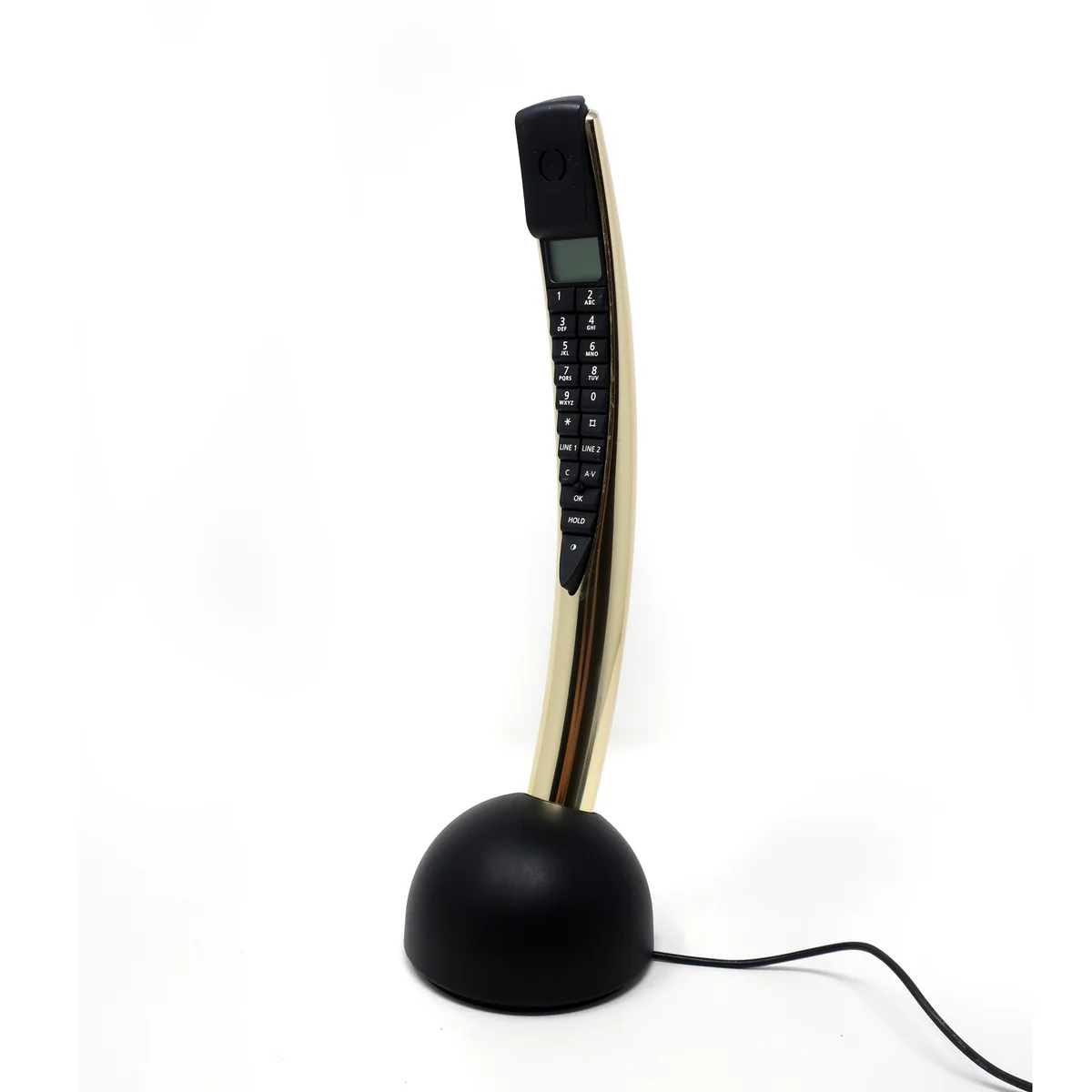
- Slim, black high‑gloss handset — integrated answering machine (BeoLine base).
- Improved battery life over BeoCom 2.
- Fully compatible with BeoCom 6000 and BeoCom 2 within same system.
🛠️ Known failures
- Same scroll joystick fragility as BeoCom 2.
- NiMH battery pack (CS‑BEC500CL) degrades after 3‑5 years.
- DECT link failure after base reset — requires re‑registration.
- Microphone volume low (contaminated membrane).
BeoCom 5 shares the same accessory ecosystem as 6000 and 2.
🔩 Universal BeoCom failure points
| Area | Symptoms | Affected models | Typical fix |
|---|
| NiMH battery pack
| Short standby, handset dies mid‑call, swollen or leaking battery, no charge
| BeoCom 6000, 1, 2, 5
| Replace battery pack (CS‑BEC600CL, CS‑BEC500CL or equivalent)
|
| Charging contacts (handset & base)
| Handset placed in base but charging indicator does not light, battery does not charge
| All cordless DECT models
| Clean contacts with isopropyl alcohol, check spring tension, re‑solder cracked joints
|
| Scroll wheel / navigation joystick
| Pointer moves erratically, stuck, or broken plastic nipple
| BeoCom 2, 5 (less on 6000)
| For broken nipple: heat‑shrink tubing + bolt shaft repair; clean optical sensor
|
| Keyboard rubber strip / contacts
| One or more keys not responding (e.g., «INT», «C», digit keys)
| BeoCom 6000, 1
| Disassemble, clean rubber strip and PCB contacts with isopropyl, align correctly
|
| Display ribbon / LCD
| Random lines on screen, missing segments, no display on power‑on
| BeoCom 6000, 1, 2, 2000, 2200
| Reseat or clean ribbon contacts; for zebra strip: replace conductive elastomer
|
| Electrolytic capacitors (corded models)
| No dial tone, intermittent function, low audio volume, ringer dead
| BeoCom 2000, 2200
| Full recap of audio/PSTN/PSU sections with 105°C low‑ESR caps
|
| Lithium memory battery
| Phonebook lost after power cut, settings not saved
| BeoCom 2000, 1000 (some variants)
| Replace with compatible 3V lithium coin cell (CR2032 or similar)
|
| DECT registration failure
| Handset shows «Not Base 1», cannot make calls, no link to BeoLine base
| All DECT models (6000, 1, 2, 5)
| Reset handset via service menu (9#9#9✱INT), re‑register to base using registration mode
|
Complete BeoCom Restoration Services I Offer
🔋 Battery Pack Replacement Remove degraded NiMH packs, clean leakage, install new 3.6V 700–900 mAh battery packs (genuine‑spec).
⚡ Charging Circuit & Base Repair Repair BeoLine PSTN/ISDN base charging circuits, replace dried capacitors, clean contacts, reflow solder joints.
🔘 Keyboard & Scroll Wheel Restoration Disassemble, clean rubber contact strips, repair cracked plastic scroll‑nipple (BeoCom 2/5), restore keypad tactility.
📟 Display Module Repair Clean ribbon/zebra connectors, replace LCD if cracked, fix missing or garbled segments.
🎙️ Audio & Microphone Service Test and replace handset microphone, dynamic speaker, ringer element. Repair crackling or low‑volume issues.
🔌 Corded Phone Recap (2000/2200/1000) Replace all aluminum‑case and electrolytic capacitors in PSTN, audio and power sections. Restore lithium memory backup.
📡 DECT Registration & Firmware Re‑register handsets to BeoLine PSTN/ISDN bases, reset via service menu, solve «Not Base 1» and no‑dial‑tone issues.
🏆 Complete Full Restoration All of the above — your BeoCom handset and base restored to original building‑quality standards.
💡 MY RESTORATION INCLUDES: Battery replacement • Charging contact cleaning • Scroll‑joystick repair • Keyboard restoration • Display connector service • Full capacitor replacement (corded models) • DECT re‑registration • 90‑day warranty.
🔋 Battery safety: I only use high‑quality NiMH replacement packs that match original 3.6V capacity. Swollen or leaking batteries are replaced immediately — I follow safe handling and disposal protocols for chemical waste.
🔋 BeoCom 6000 / BeoCom 1 / BeoCom 2 / BeoCom 5 — Universal NiMH battery specifications
Nominal voltage: 3.6 V (3× 1.2 V NiMH cells in series).
Typical capacity: 700 mAh (BeoCom 6000), 800–900 mAh (BeoCom 2 / 5).
OEM part numbers: 3HR‑AAAU, 70AAAH3BMXZ, T373 (6000); 3160585 (BeoCom 5).
Charging: Fast‑charge through base contacts, full charge in ≈4 h.
// Handset reset procedure (BeoCom 6000 Mk2 / BeoCom 1 / BeoCom 2 / BeoCom 5):
1. Press 9 # 9 # 9 ✱ INT to enter service menu.
2. Scroll to «RESET handset» using navigation wheel.
3. Press center button to confirm reset.
4. Re‑register to BeoLine base by placing handset in charger (if first handset) or manual registration.
⚠️ Note: Have PSTN PIN code available (default 0000).
🔧 Repair‑from‑bench highlights
- BeoCom 6000 – Buttons not working (e.g., «INT», «C»): The lower rubber strip on the PCB loses contact. I disassemble, clean the rubber strip with a soft brush, clean PCB contacts with isopropyl, and reassemble. Contact pins around the keypad must be properly aligned.
- BeoCom 6000 – Handset does not charge: Inspect charging contacts on both handset and base. Verdigris (green oxidation) is common. I clean with DeoxIT, check spring pressure, and re‑solder any cracked joints. If base PSU capacitors are dried, I replace them.
- BeoCom 2 – Broken scroll joystick nipple: I fabricate a repair: remove leftover plastic, slide heat‑shrink tubing over the white plastic stem, and insert a short plastic bolt shaft into the heat‑shrink for rigidity. The repaired pointer provides reliable navigation without replacement.
- BeoCom 2 – Display backlight dim or missing: Many units have cold solder joints on the LED PCB. I reflow the solder for all four backlight LEDs, restoring full brightness.
- BeoLab ・ BeoCom random display lines / boot failure: The ribbon connector for the display becomes oxidized. I clean the ribbon and PCB contacts with contact cleaner, then reseat firmly.
- BeoCom 2000/2200 – No dial tone, intermittent function: Electrolytic capacitors in the PSTN interface and audio sections have drifted out of spec after 20+ years. I perform a full recap using Nichicon PW/Panasonic FC series (105 °C, low‑ESR).
📟 Display ribbon re‑seating caution: BeoCom 6000 and BeoCom 1 use delicate ribbon connectors. Excessive force can tear the ribbon. I use plastic pry tools and never pull by the ribbon cable itself.
📞 BeoLine PSTN / ISDN Base – Common failures
LED not lit, no registration: Internal step‑down transformer or main filter cap dead. I test and replace.
Registration times out: Base not entering registration mode. I check the registration button leaf switch and service the base logic board.
No dial tone from base: PSTN line interface IC (often Si3050 or equivalent) may be damaged. I can replace SMD ICs.
Base resets when ringing: Low current from PSU – dried secondary capacitors. Full recap required.
📡 Base compatibility: BeoCom 6000, BeoCom 1, BeoCom 2 and BeoCom 5 can all be used together on the same BeoLine PSTN/ISDN base (Mk1 supports up to 6 handsets, Mk2 up to 8). I can re‑register handsets to match your base type.
🔍 Quick Troubleshooting Reference Chart
| Symptom | Model(s) | Most likely cause | My fix |
|---|
| Handset dead, no charge response | 6000, 1, 2, 5 | NiMH battery pack dead or leaking | Replace battery, clean contacts |
| Charging LED on base does not light | All DECT | Oxidized contacts or base PSU failure | Clean contacts; if no change, recap base PSU |
| One or more buttons not working | 6000, 1 | Dirty rubber contact strip | Disassemble, clean rubber and PCB contacts with isopropyl |
| Scroll wheel broken / pointer missing | 2, 5 | Plastic nipple snapped off | Heat‑shrink tubing + bolt shaft repair |
| Display shows random lines, no boot | 6000, 1, 2 | Oxidized ribbon connector | Clean ribbon contacts with contact cleaner, reseat |
| No dial tone, intermittent function | 2000, 2200 | Dried electrolytic capacitors | Full recap of PSTN/audio/power sections |
| Phonebook lost after power cut | 2000, 1000 | Lithium memory battery dead | Replace with CR2032 or equivalent |
| Handset shows «Not Base 1» | 6000, 1, 2, 5 | DECT registration lost or base faulty | Reset handset (9#9#9✱INT), re‑register to base |
🇺🇸 NATIONWIDE SERVICE AVAILABLE 🇺🇸
Ship your BeoCom handset and/or BeoLine base securely — I serve all 50 states
My Service Area — Local & Nationwide
Local Service: Los Angeles County, Orange County, Ventura County, Riverside County, San Bernardino County.
Nationwide Service: Secure packing: bubble wrap handset, tape battery compartment closed, do not ship swollen batteries. I can also send you pre‑paid packaging.
Los Angeles County: LA Burbank Glendale Santa Monica Hollywood Pasadena
Nationwide: NY TX FL IL WA All 50 States
📞 BeoCom legacy (1985–2014): The Beocom line pioneered high‑design telecommunication for the home. From the colourful grid‑phones of the 1980s (BeoCom 1000, 2000, 2200) to the DECT cordless revolution of the late 1990s (BeoCom 6000), and the iconic long‑handset BeoCom 2 and BeoCom 5 of the 2000s, these devices were as prized for their industrial design as for their crystal‑clear sound. Today, NiMH batteries have expired, electrolytic capacitors have dried, and rubber keypads have stiffened. My restoration service replaces batteries, repairs charging circuits, rebuilds broken scroll joysticks, recaps analog boards, and re‑establishes DECT registration. Whether you own a BeoCom 6000, a BeoCom 2, a BeoCom 5, a BeoCom 1, or a classic corded BeoCom 2000/2200/1000, I can restore it to original working condition — preserving these design icons for another generation.