Bang & Olufsen Authorized Service Center
 📍 Los Angeles County & SoCal
🔧 30+ Years Experience
🎚️ B&O Specialist
🏢 TEK Media Group
📍 Los Angeles County & SoCal
🔧 30+ Years Experience
🎚️ B&O Specialist
🏢 TEK Media Group
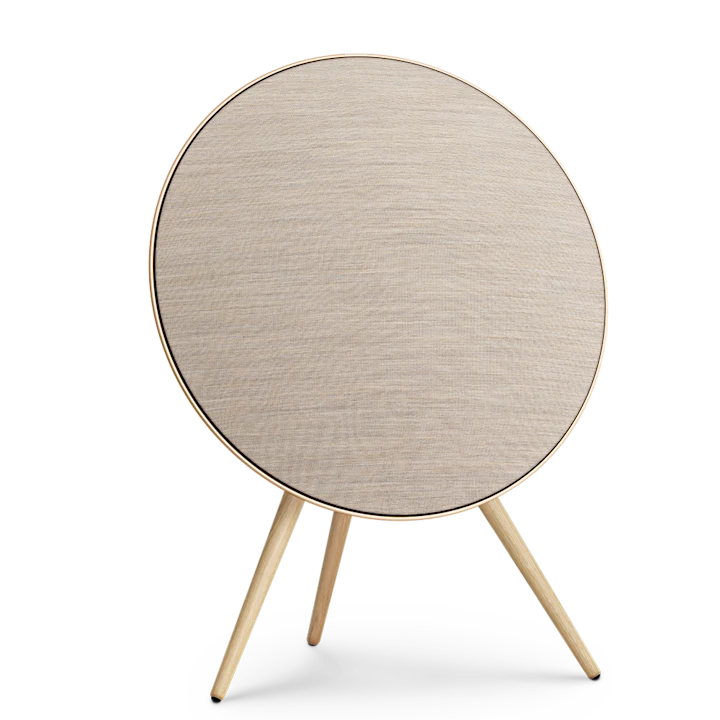
📋 A NOTE FROM MY WORKBENCH: The Beoplay A9 is a complex wireless system integrating Wi‑Fi, Bluetooth, multi‑room streaming, and advanced DSP. Early models (MkI, MkII) are now 8‑12 years old and exhibit capacitor aging, dried foam surrounds, and Wi‑Fi module instabilities. Later models (MkIII, MkIV) are more reliable but still suffer from battery‑backed memory corruption and touch panel failures. I have factory service documentation, firmware images, and component‑level repair capability for all generations. Do not attempt disassembly without proper ESD precautions.
⚠️ CRITICAL WARNING – BEOPLAY A9 SPECIFIC: The internal power supply operates on high‑voltage AC line input (110‑240V). Capacitors in the primary section can hold lethal charge for minutes after unplugging. The woofer foam surrounds on MkI and MkII units rot completely, causing bass distortion and rattling. Wi‑Fi module failures are common after power surges — I can re‑flash or replace the module. Always discharge the PSU before servicing.
- Driver layout: 8" woofer, 3" midrange, 3/4" tweeter (3 drivers).
- Amplifier: Class D, 2×160W (woofer + mid/tweeter).
- Wi‑Fi: 802.11 b/g/n (2.4 GHz only). AirPlay 1.
- Finish: White or black with wooden leg (optional stand).
🛠️ Known failures
- Woofer foam surround rot (very common after 8‑10 years).
- Power supply main filter caps bulge → hum, no power.
- Wi‑Fi module needs re‑flashing after power cycling.
- Touch volume slider becomes intermittent (ribbon cable oxidised).
- Amplifier channel failure (one driver silent, distorted).
🔊 Woofer foam note: The MkI woofer foam surround rots without exception. I re‑foam with exact replacement foam (not rubber).
- Same 3‑driver array as MkI.
- Revised amplifier: better thermal management.
- AirPlay 2 support.
- Improved PSU capacitor selection.
🛠️ Known failures
- Woofer foam rot still occurs (reduced rate but still after 7‑9 years).
- Standby power supply capacitor (small 10‑47µF) fails → no start after sleep.
- Wi‑Fi module still susceptible to corruption.
- Rear LED glow ring fails (some LEDs dead).
✅ MkII advantage: Better PSU; however foam and Wi‑Fi issues remain.
- 4‑driver configuration: 8" woofer, 3" midrange, two 3/4" tweeters (stereo tweeters).
- Amplifier: 2×200W (woofer + mid/tweeter array).
- Improved Wi‑Fi module (dual‑band 2.4/5 GHz).
- Improved woofer surround material.
🛠️ Known failures
- Woofer foam still susceptible after 5‑7 years (reduced).
- Network module firmware corruption after power outage.
- Touch panel capacitive sensor dead (IC failure).
- HDMI ARC (on some variants) handshake issues.
- 4‑driver, improved DSP.
- Wi‑Fi 5 (802.11ac), AirPlay 2, Chromecast built‑in.
- Longest foam durability (rubber‑coated surround).
🛠️ Known failures (still emerging)
- Power supply capacitor aging (after 4‑5 years, still rare).
- Firmware corruption requiring re‑flash via USB.
- Touch panel sensitivity drift (calibration issue).
✨ MkIV is the most reliable, but eventually capacitors and network modules can still fail. I can service all generations.
🔩 Universal Beoplay A9 failure points (all generations)
| Area | Symptoms | Most affected | Typical fix |
|---|
| Woofer foam surround
| Distorted bass, rattling, loss of low end, visible cracks or missing foam
| MkI, MkII, early MkIII
| Re‑foam 8" woofer with exact compliance foam (not rubber)
|
| Power supply capacitors
| Hum from speaker, intermittent power, unit does not turn on, flashing LED
| MkI, MkII, some MkIII
| Full recap of primary and secondary electrolytic caps (105°C low‑ESR)
|
| Wi‑Fi / network module
| Speaker not visible on network, cannot set up, boot loop, red LED error
| All generations, especially MkI‑III
| Re‑flash firmware via USB recovery mode; replace module if flash corrupted
|
| Touch volume slider
| Volume does not change when sliding finger, erratic jumps, no response
| MkI, MkII, MkIII (common)
| Clean ribbon cable contacts, reflow sensor IC, replace capacitive sensor if dead
|
| Amplifier channel dead
| One driver (woofer or mid/tweeter) silent or distorted
| All, but more common on MkI‑II
| Repair amplifier board: replace failed Class D output FETs, driver IC, or recap
|
| Rear LED ring failure
| Some or all rear LED segments not lighting
| MkII, MkIII
| Replace individual LED or entire LED ring PCB
|
Complete Beoplay A9 Restoration Services I Offer
🔍 Full Diagnostic & Assessment Test all drivers, measure amplifier output, check PSU ripple, Wi‑Fi connectivity, touch panel operation, and firmware version.
⚡ Power Supply & Amplifier Recap Replace all electrolytic capacitors on PSU, amplifier boards, and standby rails. Use 105°C low‑ESR caps (Nichicon, Panasonic).
🔈 Woofer Re‑foaming Remove old rotted foam, clean basket, install exact‑fit 8" foam surround with proper compliance. Re‑center voice coil using tone method.
📡 Wi‑Fi Module Service Recovery firmware re‑flash via USB recovery mode. Replace module if NAND flash is corrupted beyond repair.
🖱️ Touch Panel Repair Clean ribbon contacts, reflow sensor IC, replace faulty capacitive sensor or flex cable.
🔊 Amplifier Channel Rebuild Replace failed Class D output FETs, driver IC (e.g., TAS5614, STA516B), recap signal path.
🏆 Complete Full Restoration All of the above — your Beoplay A9 returned to 100% original performance.
💡 MY RESTORATION INCLUDES: PSU and amplifier recap • Woofer re‑foaming (MkI/II/early III) • Wi‑Fi re‑flash • Touch panel service • Amplifier channel repair • Firmware update • 90‑day warranty.
🔊 Woofer re‑foaming note: I use only exact‑spec foam surrounds that match the original compliance. Rubber surrounds or generic foam will permanently alter Thiele‑Small parameters and ruin bass response. No exceptions.
📊 Beoplay A9 Amplifier & Power Specifications (by generation)
| Generation | Amplifier power | Main filter caps | Standby rail |
|---|
| MkI
| 2×160W (4Ω)
| 2× 6,800µF 50V (Panasonic/Nichicon)
| 5V via small transformer & regulator
|
| MkII
| 2×160W (improved heatsink)
| 2× 8,200µF 50V
| Improved 5V SMPS
|
| MkIII
| 2×200W
| 2× 8,200µF 63V
| 5V standby integrated on main PSU
|
| MkIV
| 2×200W (updated Class D chip)
| 2× 10,000µF 63V
| Enhanced standby regulation
|
// Wi‑Fi recovery procedure (all A9 generations with USB port):
1. Download recovery image from B&O support (or I have local copies).
2. Format USB drive as FAT32, copy firmware.bin to root.
3. Power off A9, insert USB.
4. Press and hold pairing button, then apply power.
5. Wait for orange flashing LED (recovery mode). Release button.
6. LED turns green → recovery complete after ≈10 minutes.
7. Remove USB, power cycle, reconfigure via B&O app.
🔧 Restoration tips from my bench
- A9 MkI – No power, dead: The main filter capacitors (2× 6,800µF) bulge and dry out. I replace them and also check the 5V standby regulator (often a small 78M05 or equivalent). After recap, the unit powers on reliably.
- A9 MkI/II – Bass rattles at moderate volume: The woofer foam surround has rotted. I clean the basket, remove old foam, and install new foam using a 30Hz tone to center the voice coil.
- A9 MkII – Wi‑Fi disappears after power outage: The firmware becomes corrupted. I re‑flash using the USB recovery method described above. If the module still fails, I replace the Wi‑Fi module with a compatible part.
- A9 MkIII – Touch volume slider no response: The ribbon cable connecting the touch panel to the mainboard oxidises. I disassemble, clean contacts with DeoxIT, and reseat. If the capacitive sensor IC is dead, I replace the entire panel.
- A9 – One driver silent (e.g., woofer dead, mids work): The Class D amplifier channel for that driver has failed. Common failure: output FETs shorted or driver IC (TAS5614) cracked. I replace the IC and any dead FETs, then test.
- A9 – Green LED on, no sound: DSP or network module lock‑up. I perform a hard reset (power cycle, hold pairing button), then re‑flash firmware if needed.
🔍 Quick troubleshooting reference chart
| Symptom | Most likely cause | My fix |
|---|
| No power, no LED, no response
| Dead PSU, blown fuse, bulging main caps
| Replace fuse, full recap of PSU, check standby regulator
|
| Hum from speaker, intermittent operation
| Dried main filter capacitors
| Replace 6,800‑10,000µF caps with low‑ESR 105°C
|
| Bass distorted / rattling
| Woofer foam rot (MkI‑III)
| Re‑foam 8" woofer with exact‑fit foam
|
| Wi‑Fi not visible / setup impossible
| Firmware corruption or module failed
| Re‑flash via USB; replace module if necessary
|
| Touch slider not working
| Dirty ribbon cable or dead sensor IC
| Clean contacts, reflow IC, replace panel if needed
|
| One driver silent (woofer or mid/tweeter)
| Class D amplifier channel failed
| Replace output FETs, driver IC (TAS5614 etc.), recap
|
| Speaker turns off randomly
| Overheating or standby cap failure
| Clean heatsinks, replace thermal pads, replace small standby caps
|
🇺🇸 NATIONWIDE SERVICE AVAILABLE 🇺🇸
Ship your Beoplay A9 securely — I serve all 50 states
My Service Area — Local & Nationwide
Local Service: Los Angeles County, Orange County, Ventura County, Riverside County, San Bernardino County.
Nationwide Service: Secure packing instructions for the large circular A9 — double‑box with custom foam cutouts or bubble wrap; remove the leg/stand before shipping.
Los Angeles County: LA Burbank Glendale Santa Monica Hollywood Pasadena
Nationwide: NY TX FL IL WA All 50 States
🎵 Beoplay A9 legacy (2012–present): Designed by Øivind Alexander Slaatto, the Beoplay A9 redefined the wireless speaker as a piece of sculptural furniture. Its circular form, fabric cover, and wooden leg became an instant design icon. Over four generations, B&O improved amplification, added drivers, and enhanced network capabilities. However, early units now face capacitor aging, foam rot, and Wi‑Fi module failures. My restoration service brings any A9 back to original performance — whether it's a foam‑rot repair on a MkI, a Wi‑Fi re‑flash on a MkII, or a full recap on a MkIII. I treat each A9 with the care it deserves, preserving this modern masterpiece for years to come.